

In-App FeedbackTriggersAutomatic Trigger
Page Visit Launch
Trigger the form when users land on specific pages
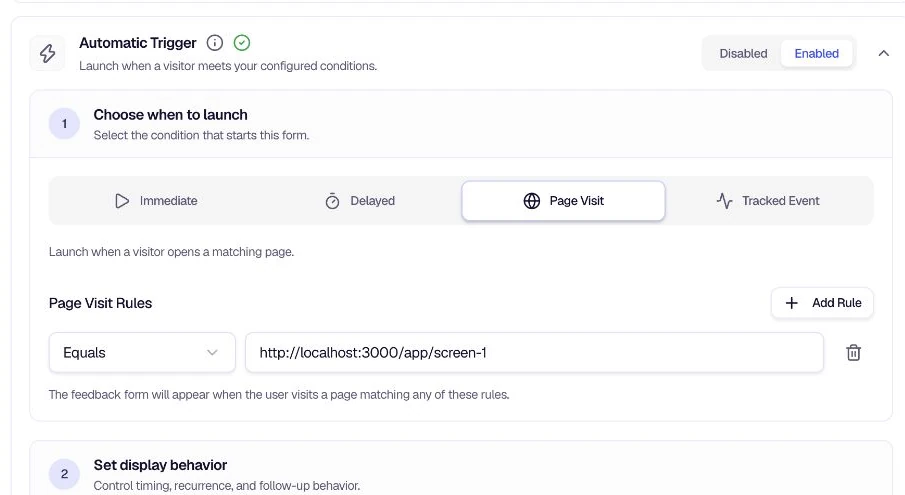
Page Visit Launch triggers the form when users land on pages matching your URL rules. Use it for post-checkout surveys, feature-specific feedback, support pages, or any flow where you want feedback tied to specific pages.
When to use
- Post-checkout surveys — Show the form on the thank-you or confirmation page.
- Feature-specific feedback — Trigger on pages for a particular feature or product.
- Support pages — Collect feedback from users who visited help or documentation.
- Landing pages — Gather feedback from visitors who reached a specific campaign page.
Configuration
Add Rule — Add page visit rules. The form triggers when the user visits a page matching any of these rules.
Matching conditions — Choose how URLs are matched:
| Condition | Description |
|---|---|
| Equals | Exact URL match |
| Starts with | URL begins with the specified string |
| Contains | URL contains the specified string |
| Pattern match (regex) | URL matches a regular expression |
| Relative path equals | Path (without domain) matches exactly |
| Relative path starts with | Path begins with the specified string |
| Relative path contains | Path contains the specified string |
| Relative pattern match | Path matches a regular expression |
Tips
- Use relative path — When your site has multiple domains (e.g. staging vs production), relative path conditions keep rules portable.
- Combine rules — Add multiple rules to cover variations (e.g.
/checkout/thank-youand/order/confirmation). - Test your regex — If using pattern match, verify your regex against sample URLs before saving.
- Pair with targeting — Use Targeting to further narrow who sees the form on those pages.
Related
- Location Restrictions — Control where the form can appear
- Tracked Event Launch — Trigger on specific user actions
Was this page helpful?