

Follow-Up Mode
Re-engage users who haven't completed the form
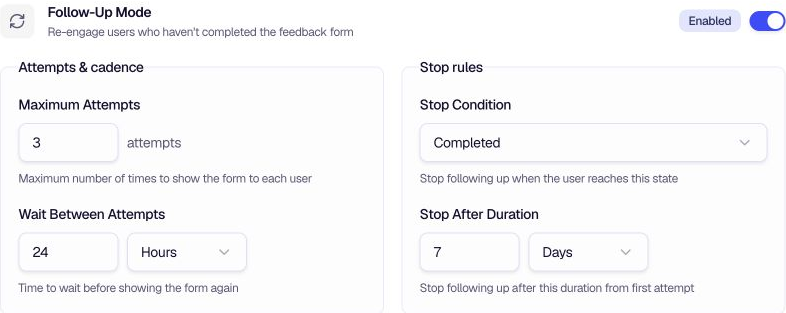
Follow-Up Mode re-engages users who haven't reached the outcome you choose. Set a stop condition, a maximum number of attempts, the wait between attempts, and the total follow-up duration.
When to use
- Increase completion rates — Give users another chance when they have not completed the form.
- Choose the right endpoint — Stop after a dismissal, a partial submission, or a completed submission.
- Respect successful submissions — Use Completed so the follow-up sequence ends after the form is submitted.
- Control persistence — Limit maximum attempts and add wait times to avoid being intrusive.
Stop conditions
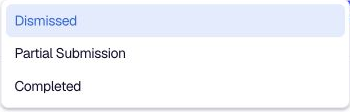
| Condition | When follow-up stops |
|---|---|
| Dismissed | Stop after the user dismisses the form. |
| Partial Submission | Stop after the user submits a partial response. |
| Completed | Stop after the user completes the form. |
Configuration
Stop Condition — Choose when to stop following up: Dismissed, Partial Submission, or Completed.
Maximum Attempts — The maximum number of times to show the form to each user. Enter a value greater than 0.
Wait Between Attempts — Enter a number and choose Minutes, Hours, or Days. This controls the pause before the next attempt.
Stop After Duration — Enter a number and choose Minutes, Hours, Days, or Weeks. Follow-ups end after this duration from the first attempt, even when Maximum Attempts has not been reached.
Tips
- Use Completed for completion campaigns — Keep the sequence active until the user submits, while the attempt and duration limits prevent over-messaging.
- Use Partial Save — Enable Partial Save so users can resume where they left off when the form reappears.
- Set reasonable limits — Start with 2–3 attempts and enough time between them for users to return naturally.
- Combine with Recurrence — Recurrence Settings control the overall cadence; Follow-Up Mode handles the re-engagement logic.
Related
- Recurrence Settings — Control how often the form appears
- Partial Save — Save incomplete responses for later
Was this page helpful?