

Triggers Overview
Configure when and how your feedback form is shown
Ever wondered when your feedback form should pop up—and when it shouldn't? The Triggers tab is your control center for exactly that. Whether you want forms to appear the moment someone lands on a page, after they complete a purchase, or only when you explicitly call for it in code, triggers give you the flexibility to collect feedback at the right moment—without annoying your users.
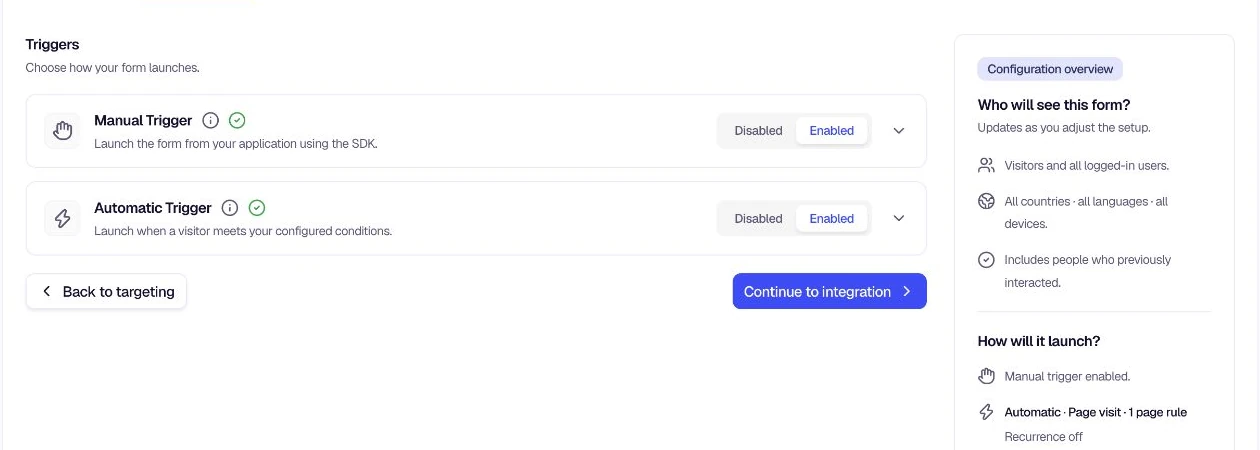
Overview
Open Distribution → In-App → Triggers. Here you'll find two main trigger types: Manual Trigger and Automatic Trigger. You can enable one, both, or neither—depending on how you want to collect feedback. Each trigger type has its own settings and use cases, so you can mix and match to fit your workflow.
The Configuration overview beside the trigger settings summarizes the active manual and automatic launch setup as you make changes.
Trigger types
| Trigger Type | Description | Use when |
|---|---|---|
| Manual Trigger | Show the form on demand via code—whenever you decide it makes sense. | You want full control (e.g. "Contact us" buttons, help menus, custom flows). |
| Automatic Trigger | Show the form based on rules you define—no code required for the basic flow. | You want hands-off collection (e.g. after page visit, on event, after delay). |
Why triggers matter
Triggers put you in control of the feedback experience. By choosing the right combination of manual and automatic triggers, launch types, recurrence, and location rules, you can:
- Collect feedback at the right moment — When users are most engaged or have just completed an action.
- Avoid survey fatigue — Use recurrence and follow-up settings to respect user time.
- Target specific flows — Show forms only on checkout pages, help sections, or after key events.
- Stay flexible — Use manual triggers for custom flows and automatic triggers for hands-off collection.
Take a few minutes to configure your triggers—your future self (and your users) will thank you!
Was this page helpful?