01
Enable In-App Feedback
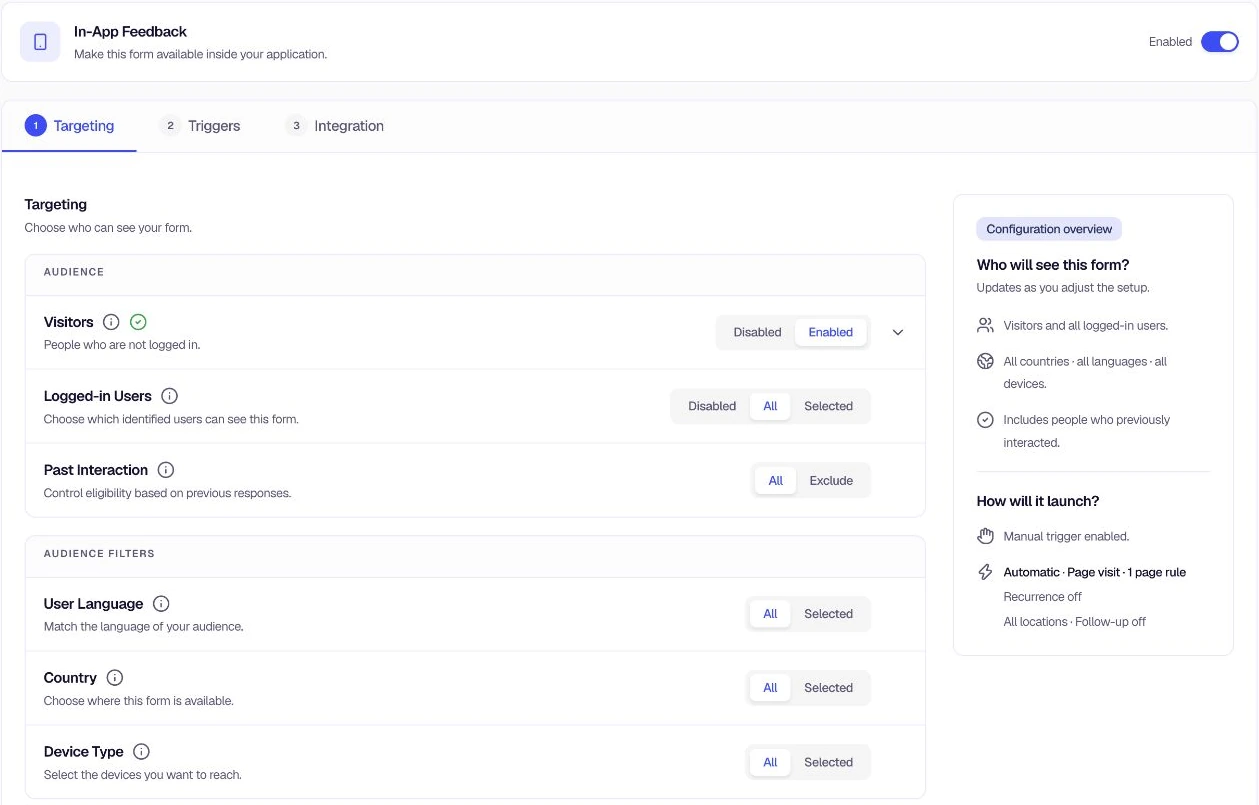
Open the Targeting tab on your form and toggle In-App Feedback on.
In App Feedback
Display feedback forms directly inside your product with precision targeting, smart triggers, and zero friction.
How it works
In-App Feedback puts you in full control of the who, when, and where. Define your audience with precision, fire forms at the right moment, and keep users engaged without over-surveying them.
Go beyond simple on/off. Target by user type, segment membership, browser language, geographic country, device, and even past feedback history — all from a single targeting panel.
Audience filters
Visitor type
Visitors + Logged-in
Language
English, Spanish
Country
US, UK, CA
Device
Desktop + Mobile
Past interaction
Exclude responders
Combine any filters for hyper-precise campaigns.
Quick workflow
From zero to collecting in-app feedback in minutes
01
Open the Targeting tab on your form and toggle In-App Feedback on.
02
Choose Visitors, Logged-in Users (all or specific segments), and add any language, country, or device filters.
03
Pick automatic (page visit, tracked event, delay) or manual (SDK call). Configure recurrence and follow-up modes.
04
Save and publish. Forms appear for the right users at the right time — responses stream in automatically.
Full capability set
In-App Feedback gives you surgical control over who sees your forms, when they see them, and how often, without writing more than a line of code.
Show forms to anonymous visitors, logged-in users, or both — independently configurable.
Include or exclude user segments. Target beta testers, premium users, or any custom group.
Narrow by browser language and geographic location for localised campaigns.
Reach users on desktop, mobile, tablet, or native app surfaces separately.
Exclude users who already saw or responded to other forms, eliminating survey fatigue.
Fire forms on custom app events like purchase_completed or trial_started.
Set intervals and stop-after durations so no user is shown the form too often.
Re-engage users who dismissed or partially completed the form.
Trigger on any URL pattern: exact match, starts with, contains, or regex.
Call feedback form anywhere in your code for fully custom trigger moments.
Bypass all targeting rules from a manual trigger when you need unconditional display.
No PII stored in targeting rules. Anonymous and segmented modes keep data clean.
Product journey
A little more detail
Common questions about targeting, triggering, and showing feedback forms inside your product.
Encatch supports A/B/N experiments on form variants, with configurable traffic splits, control groups, and phased rollouts (10%, 25%, 50%, 100%). Teams can test different question sets, form designs, trigger timings, or audience conditions and let response data determine the better-performing variant before committing to a full rollout.
Encatch includes built-in fatigue prevention controls, teams can set minimum intervals between surveys shown to the same user, cap the number of surveys per session, and apply exclude conditions based on past response history. This ensures users who have recently completed a survey are not targeted again within a defined window.
Encatch's segmentation engine lets teams target users by plan type, behavioural events, location, device, past responses, and any custom attribute passed through the SDK. Segments update in near real-time, meaning a form fires the instant a user qualifies against the defined rules, without delay or batch processing.
Product managers can describe their feedback objective in plain language and Encatch's AI generates a complete survey, including the question set, question types, and conditional branching logic in seconds. Teams can also start from 50+ pre-built templates covering NPS, CSAT, onboarding feedback, feature adoption, churn risk, and bug reporting.
Encatch AI processes open-text responses to identify recurring themes, tag sentiment as positive, neutral, or negative, detect anomalies when patterns shift suddenly, and score urgency. Product managers can also query their response data in plain language, for example, asking what the most common complaints from mobile users were last month and receive a structured, ranked answer.
Yes. Encatch supports 30+ languages with AI-assisted translation built into the platform. Teams can deploy the same feedback form across multiple geographies without creating separate form versions for each language.
Yes. Encatch supports event-based triggers, forms fire when a user completes a specific action, reaches a defined page, hits a drop-off point, or qualifies against a segment rule. This is different from scheduled or time-based surveys, which capture feedback out of context. Event-triggered delivery is the core of Encatch's targeting architecture.
Your next step
No redirects. No interruptions. Surface your forms at the exact moment users are most engaged.