

In-App FeedbackTargetingIn-App Feedback
Past Interaction
Exclude users based on their feedback history
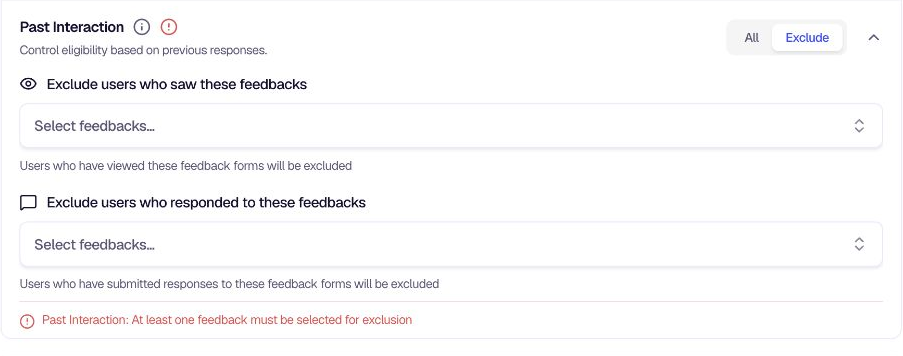
Past Interaction lets you control whether users who have already engaged with other feedback forms should see this one. This helps reduce feedback fatigue and ensures you're not repeatedly showing forms to the same people.
When to use
- All — When you want to include everyone, regardless of past feedback activity. Use for new campaigns or when overlap doesn't matter.
- Exclude — When you want to avoid users who already saw or responded to specific forms. Use to prevent fatigue, run sequential campaigns, or target only fresh respondents.
Options
| Option | Behavior |
|---|---|
| All | Include everyone, regardless of past feedback activity. |
| Exclude | Exclude users based on their past interactions. You can choose to exclude: |
| • Users who saw these feedbacks — Users who viewed specific feedback forms will not see this one. | |
| • Users who responded to these feedbacks — Users who submitted responses to specific feedback forms will not see this one. |
Configuration
- Go to Distribution → In-App → Targeting.
- Locate Past Interaction under the advanced targeting criteria.
- Choose All or Exclude.
- If Exclude, select at least one feedback form for either "saw" or "responded" to complete the configuration. Otherwise, a validation message will appear.
Tips
- Exclude responders — Use "Users who responded to these feedbacks" when you want fresh respondents who haven't already given feedback on similar topics.
- Exclude viewers — Use "Users who saw these feedbacks" when you want to avoid users who were exposed to a form but didn't submit (e.g., to retry with a different form or message).
- Combine both — You can exclude both viewers and responders of different forms for fine-grained control.
Related
- Visitors: Target anonymous users
- Logged-in Users: Target authenticated users and segments
- Segmentation overview: Build audiences with data-driven or manual segments
Was this page helpful?