

Logged-in Users
Target authenticated users and segments for in-app feedback
For users who are logged in, you can choose whether everyone sees the form or only users in specific segments. This lets you run targeted campaigns for beta testers, premium users, specific departments, or any group you've defined.
When to use
- Disabled — When you only want feedback from visitors (anonymous users).
- All — When every logged-in user should see the form. Good for broad feedback campaigns.
- Selected — When you want to target specific segments (e.g., premium plan users, beta testers, users who completed a certain action).
Options
| Option | Behavior |
|---|---|
| Disabled | Logged-in users will not see the form. |
| All | All logged-in users can see the form. |
| Selected | Only users in specific segments can see the form. You'll need to choose which segments to include (and optionally exclude). |
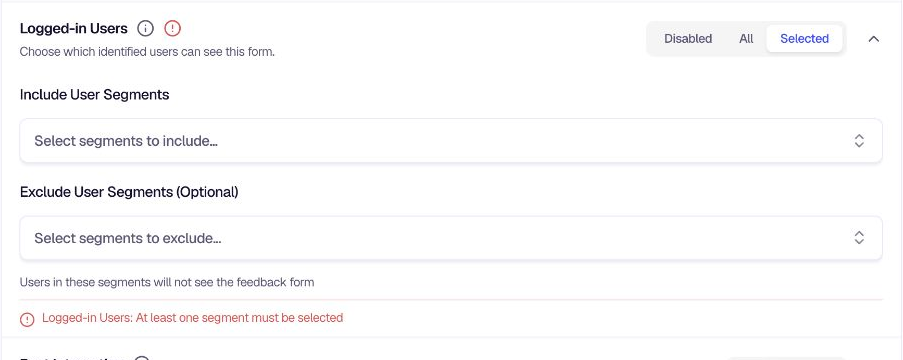
Configuration (Selected mode)
When Selected is chosen:
- Include User Segments — Select one or more segments. Only users in these segments will see the form.
- Exclude User Segments (Optional) — Optionally exclude users in certain segments. Users in excluded segments will not see the form even if they're in an included segment.
Use the search bar in the segment dropdown to find segments quickly. If you choose Selected but don't pick at least one segment to include, you'll see a validation message until the configuration is complete.
User Segmentation
Segments are groups of users defined by attributes, behavior, or hand-picked lists. encatch supports data-driven segments (rules that update automatically) and manual segments (fixed username lists).
To create segments for targeting, see Segmentation overview. For condition types (traits, tracked events, feedback interaction, and feedback response), see Data-driven segments. To reduce overlap with users who already saw other forms, combine segment targeting with Past Interaction.
Related
- Visitors: Target anonymous users
- Segmentation overview: Create and manage segments
- Data-driven segments: Build segments with traits, events, and feedback conditions
- Manual segments: Hand-picked username lists
- Past Interaction: Exclude users based on prior form activity
Was this page helpful?