

In-App FeedbackTargetingIn-App Feedback
Country
Target users by geographic location
Country lets you target users based on their geographic location. Show the form only to users in specific countries—useful for region-specific campaigns, compliance, or localized feedback.
When to use
- All — When you want feedback from users worldwide. Use for global campaigns or when location doesn't matter.
- Selected — When you're running region-specific campaigns, need to comply with local regulations, or want feedback from users in particular markets.
Options
| Option | Behavior |
|---|---|
| All | Show the form to users in any country. |
| Selected | Show the form only to users from the countries you select. |
Configuration
- Go to Distribution → In-App → Targeting.
- Locate Country under the advanced targeting criteria.
- Choose All or Selected.
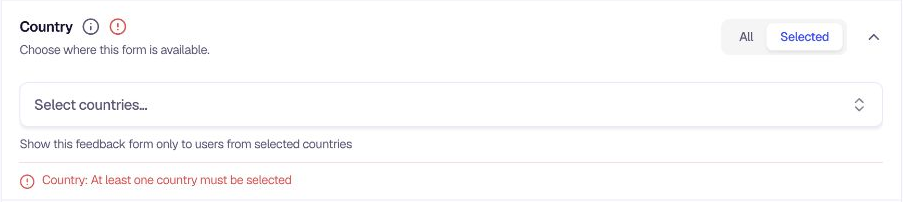
- If Selected, use the Select countries... dropdown to search and select countries. Selected countries appear as tags that you can remove with the X icon.
- You can also add custom countries if needed.
- If Selected is chosen, you must select at least one country to clear validation.
Tips
- Region-specific launches — Target users in countries where you've just launched a feature.
- Compliance — Restrict feedback collection to countries where you're legally allowed to collect data.
- Combine with language — Use Country and User Language together for highly localized campaigns.
Related
- User Language — Target by browser or device language
- Device Type — Target by device
Was this page helpful?