

Advanced Options
Throttling
Limit form views and responses over time
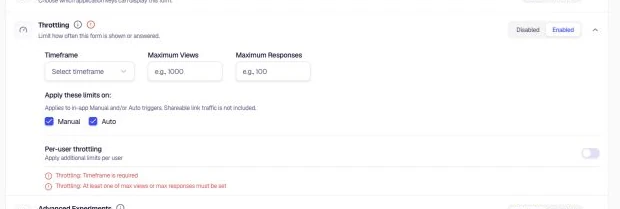
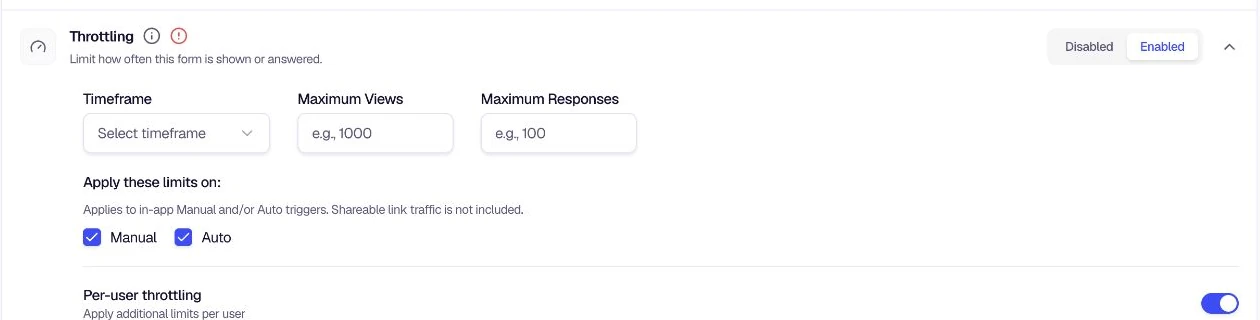
Throttling sets limits on how often an in-app form can be shown and how many responses are accepted within a timeframe. It applies to Manual triggers, Auto triggers, or both; shareable-link traffic is not included. Per-user throttling can add separate limits for each user.
When to use
- Controlling how often users see the form (e.g. once per week)
- Limiting response volume to match your capacity
- Preventing a single user from submitting multiple times
- Managing exposure across manual and auto-triggered in-app forms
Configuration
- Go to Distribution → Advanced Options and locate Throttling.
- Toggle to Enabled.
- Choose a Timeframe (e.g. Per Week, Per Day, Per Month).
- Set Maximum Views — the upper limit on how many times the form can be shown (e.g. 80,000).
- Set Maximum Responses — the upper limit on submissions (e.g. 1,000).
- Under Apply these limits on, check the boxes that apply:
- Manual — limits apply to manually triggered forms
- Auto — limits apply to automatically triggered forms
- (Optional) Enable Per-user throttling to apply additional limits per user:
- Choose Per-user Timeframe (e.g. Per Week).
- Set Per-user Maximum Views (e.g. 80).
- Set Per-user Maximum Responses (e.g. 5).
- Apply the per-user limits to Manual, Auto, or both as needed.
Was this page helpful?